
References:
Some attempts here:
https://github.com/linux4wilc/driver/issues/41
Compile on target
Using the staging driver
First we try to use the staging driver present in the linux kernel maintained by the Raspberry Foundation. We follow the configuration step shown here in chaper 2.3 “Kernel Configuration” of the ATWILC3000 porting user guide.
Is it necessary to perform additional steps? Most probably we need to enabled wpa supplicant and dhcp server etc as shown in chapter 3.
So we re-built the kernel according to the official guide and now we see:
pi@raspberrypi:~ $ cat /lib/modules/4.19.
4.19.66+/    4.19.66-v7+/ 4.19.80-v7+/
A new version appeared (4.19.80). This is a relatively heavy error. Basically what happened is that we flashed into the uSD card version 4.19.66 but then downloaded the latest release from the git repository that of course advanced from time to time. The risk here is to have a whole set of kernel modules and framworks (ex. Qt) compiled for a different version of the kernel. This can be the source of many problems since all custom built modules may not be able to inserted anymore.
To fix the problem we should have done a few steps before re-compiling the kernel with the new configuration. The correct steps are shown in the next chapter.
Getting the correct Kernel Sources
The normal way
Getting the correct source to build the kernel is trickier than one would guess. As explained on kernelnewbies.org you need the exact version of the headers from the kernel that the modules are built for.
Normally you’d simply install the kernel header package for the specific kernel version that you get when you execute uname -r, but while raspbian provides header packages, the raspberry pi foundation, who modifies them does not, as you’ll find out if you read through raspberry pi orgs forums.
The raspberry way
What they do however, is keep the complete source in their github linux repository. When they build a raspberry pi firmware, which is proprietery, closed source btw, those binaries are checked-in in the firmware repository including a file that contains the git hash that points to the commit in the linux repo that they used to build it.
So luckily for us there is a link that you can follow to get the exact source code and the steps are as follows:
- Get the Firmware Hash from the raspberry pi
- Get the Linux Kernel Hash from the ‘Firmware’ github repo
- Get the Linux Kernel Source from the ‘Linux’ github repo
# Get the Firmware Hash from the Raspberry Pi
FIRMWARE_HASH=$(zgrep "* firmware as of" /usr/share/doc/raspberrypi-bootloader/changelog.Debian.gz | head -1 | awk '{ print $5 }')

# Get the git hash for this kernel
KERNEL_HASH=$(wget https://raw.github.com/raspberrypi/firmware/$FIRMWARE_HASH/extra/git_hash -O -)

# Checkout the files on ubuntu
git checkout $KERNEL_HASH
In this way sources match with those currently installed. All the compilations we built previously are safe!
Some doubts after compilation…
We now have compiled and installed a customized kernel with wilc driver. A few questions may come:
- the module has two interfaces: SDIO and SPI. Which one is used: not a big deal here. The first interface popped up is recognized and the driver launched to used a specific iface. Look, multiple drivers contending the same iface will fail to be loaded.
- with the same inversion principle (it’s the kernel to establish the iface) somehow there should be a mechanism to pass pins to be used. How to change the default assignment? Maybe insmod-ing with some parameters?
- is it really necessary to recompile the whole kernel to enable staging drivers?
And here are the post-processing answers:
- the interface to be used is defined in the overlay indicated in the config.txt file (/boot/config.txt);
- the overlay can be configured, and the driver can be written to support, parameters passing. So in the overlay for atwilc we can set the interface and then also pass module-specific pins used. In this specific case these pins are not really correctly used so we endeded up modifying the driver;
- not a big issue: once the kernel is available and compiled once, successive modifications of the driver will cause the compilation only of that specific set of files, not of the whole kernel.
A tiny script to compile the module is this one:
#!/bin/sh -e
cd ./arch/arm/boot/dts/overlays/
gedit atwilc3000.dts
dtc -I dts -O dtb -o atwilc3000.dtb atwilc3000.dts
sudo cp atwilc3000.dtb /boot/overlays/atwilc3000.dtb
Another script to compile the whole kernel with the modules (once the instructions to configure sources are executed – see the mhcp guide):
#!/bin/sh -e
KERNEL=kernel7
make bcm2709_defconfig
make -j4 zImage modules dtbs
sudo make modules_install
sudo cp arch/arm/boot/dts/*.dtb /boot/
sudo cp arch/arm/boot/dts/overlays/*.dtb* /boot/overlays/
sudo cp arch/arm/boot/dts/overlays/README /boot/overlays/
sudo cp arch/arm/boot/zImage /boot/$KERNEL.img
echo "Finished building kernel. Moving to device tree"
cd ./arch/arm/boot/dts/overlays/
gedit atwilc3000.dts
dtc -I dts -O dtb -o atwilc3000.dtb atwilc3000.dts
sudo cp atwilc3000.dtb /boot/overlays/atwilc3000.dtb
Reloading the module
sudo insmod /lib/modules/4.19.75-v7+/kernel/drivers/net/wireless/mchp/wilc-spi.koUsing SPI0
The first attempt is to try to use SPI0
We used a few pins:
- 3.3V, GND
- MOSI (rpi 19 – gpio10)
- MISO (rpi 21 – gpio9)
- CLOCK (rpi 23 – gpio 11)
- CS (rpi 24 – gpio 8)
- INT (shield 7 – gpio 17)
- ENABLE (5 – gpio 22)
- RESET_N (32 – gpio 27)
Nothing happens. We tried with the official driver sources but again no luck. Looks like the module is not actually loaded since there is no compatible devices. Let’s try a device tree modification.
The bcm2710-rpi-cm3.dts show the following lines:
&spi0 {
        pinctrl-names = "default";
        pinctrl-0 = <&spi0_pins &spi0_cs_pins>;
        cs-gpios = <&gpio 8 1>, <&gpio 7 1>;

        spidev0: spidev@0{
                compatible = "spidev";
                reg = <0>;      /* CE0 */
                #address-cells = <1>;
                #size-cells = <0>;
                spi-max-frequency = <125000000>;
        };

        spidev1: spidev@1{
                compatible = "spidev";
                reg = <1>;      /* CE1 */
                #address-cells = <1>;
                #size-cells = <0>;
                spi-max-frequency = <125000000>;
        };
};
What if we trigger the “wilc1000” in the device spi0 node? let’s check if there is an example of overlay using spi
https://github.com/raspberrypi/firmware/blob/master/boot/overlays/README
For example enc28j60 uses SPI0:
// Overlay for the Microchip ENC28J60 Ethernet Controller
/dts-v1/;
/plugin/;
/ {
compatible = "brcm,bcm2835";
fragment@0 {
target = <&spi0>;
__overlay__ {
/* needed to avoid dtc warning */
#address-cells = <1>;
#size-cells = <0>;
status = "okay";
eth1: enc28j60@0{
compatible = "microchip,enc28j60";
reg = <0>; /* CE0 */
pinctrl-names = "default";
pinctrl-0 = <ð1_pins>;
interrupt-parent = <&gpio>;
interrupts = <25 0x2>; /* falling edge */
spi-max-frequency = <12000000>;
status = "okay";
};
};
};
fragment@1 {
target = <&spidev0>;
__overlay__ {
status = "disabled";
};
};
fragment@2 {
target = <&gpio>;
__overlay__ {
eth1_pins: eth1_pins {
brcm,pins = <25>;
brcm,function = <0>; /* in */
brcm,pull = <0>; /* none */
};
};
};
__overrides__ {
int_pin = <ð1>, "interrupts:0",
<ð1_pins>, "brcm,pins:0";
speed = <ð1>, "spi-max-frequency:0";
};
};
Let’s first try to add someting on spi0 (increasing the number of compatible devices):
&spi0 {
        pinctrl-names = "default";
        pinctrl-0 = <&spi0_pins &spi0_cs_pins>;
        cs-gpios = <&gpio 8 1>, <&gpio 7 1>;

        spidev0: spidev@0{
                compatible = "spidev", "microchip,wilc1000", "microchip,wilc3000";
                reg = <0>;      /* CE0 */
                #address-cells = <1>;
                #size-cells = <0>;
                spi-max-frequency = <125000000>;
        };

        spidev1: spidev@1{
                compatible = "spidev";
                reg = <1>;      /* CE1 */
                #address-cells = <1>;
                #size-cells = <0>;
                spi-max-frequency = <125000000>;
        };
};
We need to recompile the DTB:
dtc -I dts -O dtb -o bcm2710-rpi-cm3.dtb bcm2710-rpi-cm3.dtsIf a fatal error occurs, you have to use a different version of DTC compiler found here:
https://github.com/beagleboard/bb.org-overlays/blob/master/dtc-overlay.sh
The script will install a new version of DTC for you.
So what’s the result of the modification?
Error: bcm2710-rpi-cm3.dts:3.1-9 syntax error
FATAL ERROR: Unable to parse input tree
Looks like there are dependencies to be addressed and they cannot be changed easily. A better way could be to use make dtbs. We first remove the .stb and then issue the command. To check if the mods are on place, let’s conver the .dtb back:
dtc -I dts -O dtb -o bcm2710-rpi-cm3.dtb bcm2710-rpi-cm3.dtsThe compatible strings are in place, so we copy the .dtb back to see what happens.
Again from dmesg no presence of any debug strings related to wilc. No signals on the scope either. The kernel module is not loaded for some reason. So we moved to an overlay. We almost adapted the enc28j60 one and the driver is finally loaded. But some errors occurs.
First we check pins. We are using the eval board ATWILC3000
https://www.microchip.com/DevelopmentTools/ProductDetails/PartNO/ATWILC3000-SHLD
Ok, we found the pins to modify, they are defined in wilc_wlan.h:
#define GPIO_NUM		0x5B
#define GPIO_NUM_CHIP_EN	94
#define GPIO_NUM_RESET		60
While the gpio activity is mainly confined in wilc_netdev.c:
static int init_irq(struct net_device *dev)
{
	int ret = 0;
	struct wilc_vif *vif = netdev_priv(dev);
	struct wilc *wl = vif->wilc;

#if KERNEL_VERSION(3, 13, 0) < LINUX_VERSION_CODE

	wl->gpio_irq = gpiod_get(wl->dt_dev, "irq", GPIOD_IN);
	if (IS_ERR(wl->gpio_irq)) {
		dev_warn(wl->dev, "failed to get IRQ GPIO, load default\r\n");
		wl->gpio_irq = gpio_to_desc(GPIO_NUM);
		if (!wl->gpio_irq) {
			dev_warn(wl->dev, "failed to load default irq\r\n");
			return -1;
		}
	} else {
		dev_info(wl->dev, "got gpio_irq successfully\r\n");
	}

	ret = gpiod_direction_input(wl->gpio_irq);
	if (ret) {
		PRINT_ER(dev, "could not obtain gpio for WILC_INTR\n");
		return ret;
	}

	wl->dev_irq_num = gpiod_to_irq(wl->gpio_irq);
	if (wl->dev_irq_num < 0) {
		PRINT_ER(dev, "could not the IRQ\n");
		goto free_gpio;
	}
#else
	wl->gpio_irq = of_get_named_gpio_flags(wl->dt_dev->of_node,
					       "irq-gpios", 0, NULL);
	if (wl->gpio_irq < 0) {
		wl->gpio_irq = GPIO_NUM;
		dev_warn(wl->dev, "failed to get IRQ GPIO, load default\r\n");
	}

	if ((gpio_request(wl->gpio_irq, "WILC_INTR") == 0) &&
	    (gpio_direction_input(wl->gpio_irq) == 0)) {
		wl->dev_irq_num = gpio_to_irq(wl->gpio_irq);
	} else {
		dev_err(wl->dev, "could not obtain gpio for WILC_INTR\n");
		wl->gpio_irq = 0;
		return -1;
	}

#endif

	if (wl->io_type == WILC_HIF_SPI ||
		wl->io_type == WILC_HIF_SDIO_GPIO_IRQ) {
		if (request_threaded_irq(wl->dev_irq_num, isr_uh_routine,
					 isr_bh_routine, IRQF_TRIGGER_LOW |
							IRQF_ONESHOT |
							IRQF_NO_SUSPEND,
					 "WILC_IRQ", wl) < 0) {
			PRINT_ER(dev, "Failed to request IRQ\n");
			goto free_gpio;
		}
	} else {
		if (request_irq(wl->dev_irq_num, host_wakeup_isr,
					     IRQF_TRIGGER_FALLING |
					     IRQF_NO_SUSPEND,
					     "WILC_IRQ", wl) < 0) {
			PRINT_ER(dev, "Failed to request IRQ\n");
			goto free_gpio;
		}
	}

	PRINT_INFO(dev, GENERIC_DBG, "IRQ request succeeded IRQ-NUM= %d\n",
		   wl->dev_irq_num);
	enable_irq_wake(wl->dev_irq_num);
	return ret;

free_gpio:
#if KERNEL_VERSION(3, 13, 0) < LINUX_VERSION_CODE
	gpiod_put(wl->gpio_irq);
	wl->gpio_irq = NULL;
#else
	gpio_free(wl->gpio_irq);
	wl->gpio_irq = 0;
#endif
	return -1;
}
Which pins should we use exactly? By looking at the spi0 device tree, we see:
	spi0_pins: spi0_pins {
		brcm,pins = <9 10 11>;
		brcm,function = <4>; /* alt0 */
	};

	spi0_cs_pins: spi0_cs_pins {
		brcm,pins = <8 7>;
		brcm,function = <1>; /* output */
	};
9,10,11 are referred to BCM pins, as well as 8,7 (CE0 and CE1). If we modify the GPIOs to adapt to our board, we’ll have:
#define GPIO_NUM		17
#define GPIO_NUM_CHIP_EN	22
#define GPIO_NUM_RESET		27
Mapping from BCM pins and GPIOs numbers can be evaluated using the pinout tool:
Checking Raspberry Pi Revision Number & Board Version
From the scope we see signals are ok, except for IRQ. Many errors still occur:
[  190.332404] WILC_SPI spi0.0 wlan0: INFO [wilc_mgmt_frame_register]Frame registering Frame Type: d0: Boolean: 0
[  190.332409] WILC_SPI spi0.0 wlan0: INFO [wilc_mgmt_frame_register]Return since mac is closed
[  190.332418] WILC_SPI spi0.0 wlan0: INFO [wilc_mgmt_frame_register]Frame registering Frame Type: d0: Boolean: 0
[  190.332423] WILC_SPI spi0.0 wlan0: INFO [wilc_mgmt_frame_register]Return since mac is closed
[  190.332429] WILC_SPI spi0.0 wlan0: INFO [wilc_mgmt_frame_register]Frame registering Frame Type: d0: Boolean: 0
[  190.332434] WILC_SPI spi0.0 wlan0: INFO [wilc_mgmt_frame_register]Return since mac is closed
[  190.333258] WILC_SPI spi0.0 wlan0: INFO [wilc_mac_open]MAC OPEN[5bbe9abd] wlan0
[  190.333277] WILC_SPI spi0.0 wlan0: INFO [wilc_init_host_int]Host[5bbe9abd][d3bbf768]
[  190.333288] WILC_SPI spi0.0 wlan0: INFO [wilc_mac_open]*** re-init ***
[  190.333296] WILC_SPI spi0.0 wlan0: INFO [wilc_wlan_init]Initializing WILC_Wlan
[  190.380069] WILC_SPI spi0.0 wlan0: ERR [wilc_wlan_initialize:914] Initializing WILC_Wlan FAILED
[  190.380075] WILC_SPI spi0.0 wlan0: ERR [wilc_mac_open:1038] Failed to initialize wilc
[  190.422027] WILC_SPI spi0.0 wlan0: INFO [wilc_mac_open]MAC OPEN[5bbe9abd] wlan0
[  190.422049] WILC_SPI spi0.0 wlan0: INFO [wilc_init_host_int]Host[5bbe9abd][d3bbf768]
[  190.422063] WILC_SPI spi0.0 wlan0: INFO [wilc_mac_open]*** re-init ***
[  190.422069] WILC_SPI spi0.0 wlan0: INFO [wilc_wlan_init]Initializing WILC_Wlan
[  190.468858] WILC_SPI spi0.0 wlan0: ERR [wilc_wlan_initialize:914] Initializing WILC_Wlan FAILED
[  190.468865] WILC_SPI spi0.0 wlan0: ERR [wilc_mac_open:1038] Failed to initialize wilc
From MOSI we have good signals, at around 83ns (120MHz). Most probably this is too fast. So we try to clamp the maximum speed to something like 12MHz. Even with this modification we don’t see any toggling on MISO. The problem was that Chip Select pin was not connected properly, so actually the shield didn’t get any data! Now the logs look different:
[   31.033292] WILC_SPI spi0.0 wlan1: INFO [wilc_mgmt_frame_register]Frame registering Frame Type: d0: Boolean: 0
[   31.033302] WILC_SPI spi0.0 wlan1: INFO [wilc_mgmt_frame_register]Return since mac is closed
[   31.034900] WILC_SPI spi0.0 wlan1: INFO [wilc_mac_open]MAC OPEN[44438583] wlan1
[   31.034929] WILC_SPI spi0.0 wlan1: INFO [wilc_init_host_int]Host[44438583][f099fcee]
[   31.034946] WILC_SPI spi0.0 wlan1: INFO [wilc_mac_open]*** re-init ***
[   31.034957] WILC_SPI spi0.0 wlan1: INFO [wilc_wlan_init]Initializing WILC_Wlan
[   31.037212] WILC_SPI spi0.0 wlan1: INFO [wilc_wlan_initialize]WILC Initialization done
[   31.037798] WILC_SPI spi0.0 wlan1: INFO [wilc_wlan_get_firmware]Detect chip WILC3000
[   31.037810] WILC_SPI spi0.0 wlan1: INFO [wilc_wlan_get_firmware]loading firmware mchp/wilc3000_wifi_firmware.bin
[   31.037821] WILC_SPI spi0.0 wlan1: INFO [wilc_wlan_get_firmware]WLAN firmware: mchp/wilc3000_wifi_firmware.bin
[   31.037884] WILC_SPI spi0.0: Direct firmware load for mchp/wilc3000_wifi_firmware.bin failed with error -2
[   31.037901] WILC_SPI spi0.0 wlan1: ERR [wilc_wlan_get_firmware:554] mchp/wilc3000_wifi_firmware.bin - firmware not available
[   31.037912] WILC_SPI spi0.0 wlan1: ERR [wilc_wlan_initialize:940] Can't get firmware
[   31.038600] wilc_handle_isr,>> UNKNOWN_INTERRUPT - 0x00000000
[   32.072216] WILC_SPI spi0.0 wlan1: ERR [wilc_wlan_initialize:994] WLAN initialization FAILED
[   32.072229] WILC_SPI spi0.0 wlan1: ERR [wilc_mac_open:1038] Failed to initialize wilc
[   32.146622] WILC_SPI spi0.0 wlan1: INFO [wilc_mac_open]MAC OPEN[44438583] wlan1
[   32.146659] WILC_SPI spi0.0 wlan1: INFO [wilc_init_host_int]Host[44438583][f099fcee]
[   32.146682] WILC_SPI spi0.0 wlan1: INFO [wilc_mac_open]*** re-init ***
[   32.146693] WILC_SPI spi0.0 wlan1: INFO [wilc_wlan_init]Initializing WILC_Wlan
[   32.149139] WILC_SPI spi0.0 wlan1: INFO [wilc_wlan_initialize]WILC Initialization done
[   32.149699] WILC_SPI spi0.0 wlan1: INFO [wilc_wlan_get_firmware]Detect chip WILC3000
[   32.149710] WILC_SPI spi0.0 wlan1: INFO [wilc_wlan_get_firmware]loading firmware mchp/wilc3000_wifi_firmware.bin
[   32.149722] WILC_SPI spi0.0 wlan1: INFO [wilc_wlan_get_firmware]WLAN firmware: mchp/wilc3000_wifi_firmware.bin
[   32.149791] WILC_SPI spi0.0: Direct firmware load for mchp/wilc3000_wifi_firmware.bin failed with error -2
[   32.149808] WILC_SPI spi0.0 wlan1: ERR [wilc_wlan_get_firmware:554] mchp/wilc3000_wifi_firmware.bin - firmware not available
[   32.149818] WILC_SPI spi0.0 wlan1: ERR [wilc_wlan_initialize:940] Can't get firmware
[   32.150500] wilc_handle_isr,>> UNKNOWN_INTERRUPT - 0x00000000
[   33.192157] WILC_SPI spi0.0 wlan1: ERR [wilc_wlan_initialize:994] WLAN initialization FAILED
[   33.192170] WILC_SPI spi0.0 wlan1: ERR [wilc_mac_open:1038] Failed to initialize wilc
The log looks quite self-explanatory:
[ 32.149808] WILC_SPI spi0.0 wlan1: ERR [wilc_wlan_get_firmware:554] mchp/wilc3000_wifi_firmware.bin - firmware not availableWe added the folder /lib/firmware/mchp and then copied all the .bin files. Firmware now seems to be loaded correctly:
[  591.904853] WILC_SPI spi0.0 wlan1: INFO [wilc_wlan_init]Initializing WILC_Wlan
[  591.906736] WILC_SPI spi0.0 wlan1: INFO [wilc_wlan_initialize]WILC Initialization done
[  591.907229] WILC_SPI spi0.0 wlan1: INFO [wilc_wlan_get_firmware]Detect chip WILC3000
[  591.907239] WILC_SPI spi0.0 wlan1: INFO [wilc_wlan_get_firmware]loading firmware mchp/wilc3000_wifi_firmware.bin
[  591.907250] WILC_SPI spi0.0 wlan1: INFO [wilc_wlan_get_firmware]WLAN firmware: mchp/wilc3000_wifi_firmware.bin
[  591.907583] WILC_SPI spi0.0 wlan1: INFO [wilc_firmware_download]Downloading Firmware ...
[  591.907590] wilc_wlan_firmware_downloadDownloading firmware size = 135992
[  591.907815] wilc_handle_isr,>> UNKNOWN_INTERRUPT - 0x00000000
[  592.904440] wilc_wlan_firmware_download Offset = 119232
[  592.905271] wilc_handle_isr,>> UNKNOWN_INTERRUPT - 0x00000000
[  593.087863] wilc_wlan_firmware_download Offset = 135992
[  593.087890] WILC_SPI spi0.0 wlan1: INFO [wilc_firmware_download]Download Succeeded
[  593.087955] WILC_SPI spi0.0 wlan1: INFO [wilc_start_firmware]Starting Firmware ...
[  593.088708] wilc_handle_isr,>> UNKNOWN_INTERRUPT - 0x00000000
[  593.092393] WILC_SPI spi0.0 wlan1: INFO [wilc_start_firmware]Waiting for FW to get ready ...
[  593.093242] wilc_handle_isr,>> UNKNOWN_INTERRUPT - 0x00000000
[  593.184044] WILC_SPI spi0.0 wlan1: INFO [wilc_start_firmware]Firmware successfully started
[  593.198425] WILC_SPI spi0.0 wlan1: INFO [wilc_wlan_initialize]WILC Firmware Ver = WILC_WIFI_FW_REL_15_2_1 Build: 11257
[  593.198440] WILC_SPI spi0.0 wlan1: INFO [wilc_init_fw_config]Start configuring Firmware
[  593.310793] WILC_SPI spi0.0 wlan1: INFO [wilc_mac_open]Mac address: fa:f0:05:c0:26:90
And also automagically we got a brand new wifi interface:
wlan1: flags=4163<UP,BROADCAST,RUNNING,MULTICAST>  mtu 1500
        inet6 fe80::f427:78e5:4143:2a15  prefixlen 64  scopeid 0x20<link>
        ether fa:f0:05:c0:26:90  txqueuelen 1000  (Ethernet)
        RX packets 5  bytes 718 (718.0 B)
        RX errors 0  dropped 0  overruns 0  frame 0
        TX packets 31  bytes 3295 (3.2 KiB)
        TX errors 0  dropped 0 overruns 0  carrier 0  collisions 0
Unfortunately it looks like we cannot acquire an ip address. The guide use some commands there:
Useful commands
During development you may use a USB wifi adatper (one of those recognized from Raspberry foundation for example) and you may want to understand what physical device is mapped to a specific wlan iface. You can do this with
ls -l /sys/class/net/Also, you can run a reset script at boot via /etc/init.rc file (add script lauch where needed). An example of script is the following:
#!/bin/sh

LOGF=/home/pi/log_init_iface_wlan_spi.txt
TMPF=/home/pi/log_init_iface_wlan_spi.txt

ls -l /sys/class/net/ | grep -n wlan0 > $TMPF
IFACEID=`head -c 1 $TMPF`

echo "LDC - rc.local - reset spi wlan" > $LOGF
date >> $LOGF
echo IFACEID is $IFACEID >> $LOGF

WLANID="$(($IFACEID-3))"
WLANSTR="wlan"$WLANID
echo WLANSTR is $WLANSTR >> $LOGF

echo LDC: resetting ATWILC3000 on $WLANSTR
sleep 5
echo LDC: putting down $WLANSTR
sudo ip link set $WLANSTR down
echo LDC: pause
sleep 5
echo LDC: putting up $WLANSTR
sudo ip link set $WLANSTR up
echo LDC: wlan init finished
This is called into rc.local:
pi@raspberrypi:~ $ cat /etc/rc.local
#!/bin/sh -e
#
# rc.local
#
# This script is executed at the end of each multiuser runlevel.
# Make sure that the script will "exit 0" on success or any other
# value on error.
#
# In order to enable or disable this script just change the execution
# bits.
#
# By default this script does nothing.

# Print the IP address
_IP=$(hostname -I) || true
if [ "$_IP" ]; then
  printf "My IP address is %s\n" "$_IP"
fi

/home/pi/script_init_iface_wlan_spi.sh

exit 0
Look, once the iface is up the application should wait for some time before the IP address is assigned (if any DHCP server is present and if AP credentials are correctly set!).
Updates
Microchip delivered updates to fix some issue on the used driver:
Looks like there is something we need:
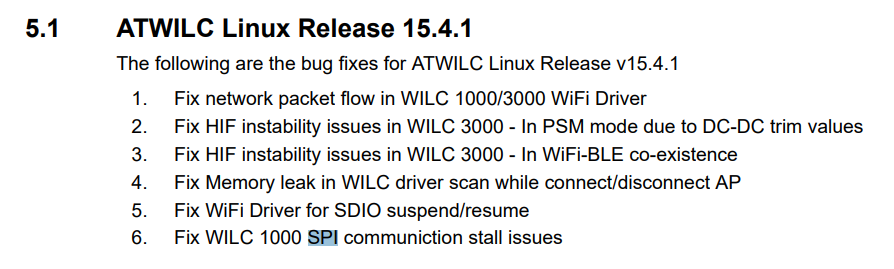
So we backup the current sources and build these:
https://github.com/linux4sam/linux-at91/tree/master/drivers/staging/wilc1000
Before the SSH connection blocked from time to time. Now it looks really better.